Tech and Digital Media

Wednesday, September 6, 2023

[New post] “How to get started with Cinebench 2024” by Monica Chin

Site logo image jaydiaz2013 posted: " Here's what you'll see. | Image: Maxon In early September, Maxon announced the release of a major update to its Cinebench benchmark, Cinebench 2024. The big change is that that the new Cinebench tests GPU power in addition to CPU p" Technopreneurph

"How to get started with Cinebench 2024" by Monica Chin

jaydiaz2013

Sep 7

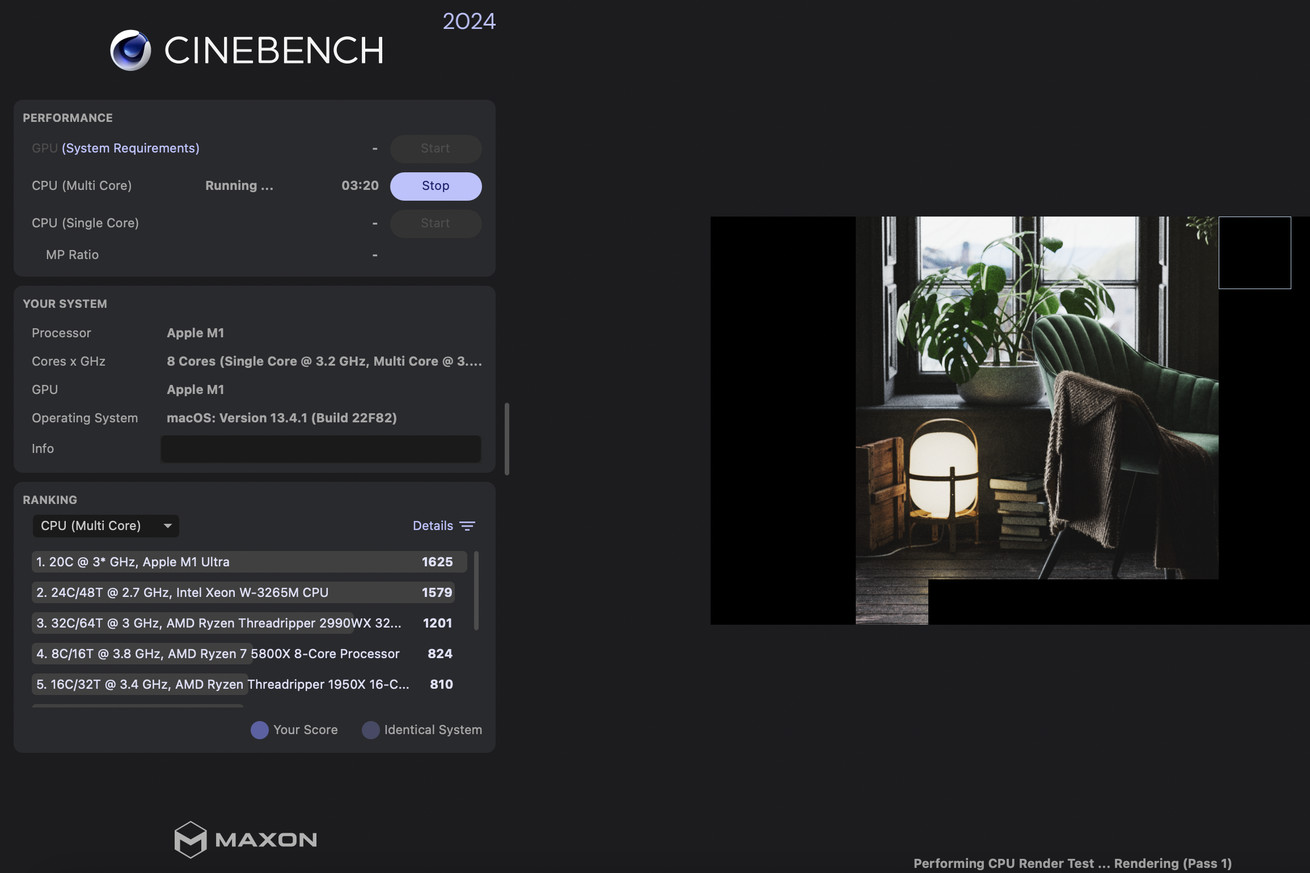
A screenshot of Cinebench 2024 in the middle of rendering the multi-core benchmark.
Here's what you'll see. | Image: Maxon

In early September, Maxon announced the release of a major update to its Cinebench benchmark, Cinebench 2024. The big change is that that the new Cinebench tests GPU power in addition to CPU power, whereas the previous version was CPU-only.

If you'd like to see how your PC performs on the new test, it's now free and available for download. And if you've never benchmarked your device before but want to try it out, Cinebench 2024 is a great place to get started. Here's how:

  • Go to Maxon's website and click the menu in the top left.
  • Go to Products > Cinebench > Download from Maxon.
  • Select the version that matches your operating system (Windows, macOS, or Windows on ARM).
A screenshot of Maxon's website with the Download Cinebench menu open, showing download options for Windows X64/X86, Windows Arm64, and macOS.
Cinebench 2024 supports X86 and X64 systems.

Once you've got the program downloaded and opened:

  • Click Start next to CPU (Multi Core) to run the 10-minute multicore benchmark.
  • Click Start next to CPU (Single Core) to run the 10-minute single-core benchmark.
  • Click Start next to GPU to test your GPU.

If you want to run the test for longer than 10 minutes, you'll want to go to File > Advanced Benchmark and change the minimum test duration.

A screenshot of Cinebench 2024 showing available start buttons next to CPU Multi Core and CPU Single Core,
My MacBook Pro doesn't have enough memory to run the GPU benchmark.

Note that in order to run the GPU benchmark, your system must include a GPU with at least 8GB of VRAM. This can be either an Nvidia GPU with CUDA compatibility (in the case of a Windows computer) or an AMD Navi or Vega GPU with HIP compatibility. (Maxon has a list of these on its website, along with other system requirements, so don't worry.) Mac computers running Apple silicon need 16GB of memory in order to run the GPU benchmark, though the CPU test can run on systems with eight or 12.

source https://www.theverge.com/23861347/cinebench-2024-how-to

Comment
Like
Tip icon image You can also reply to this email to leave a comment.

Unsubscribe to no longer receive posts from Technopreneurph.
Change your email settings at manage subscriptions.

Trouble clicking? Copy and paste this URL into your browser:
https://technopreneurph.wordpress.com/2023/09/07/how-to-get-started-with-cinebench-2024-by-monica-chin/

WordPress.com and Jetpack Logos

Get the Jetpack app to use Reader anywhere, anytime

Follow your favorite sites, save posts to read later, and get real-time notifications for likes and comments.

Download Jetpack on Google Play Download Jetpack from the App Store
WordPress.com on Twitter WordPress.com on Facebook WordPress.com on Instagram WordPress.com on YouTube
WordPress.com Logo and Wordmark title=

Automattic, Inc. - 60 29th St. #343, San Francisco, CA 94110  

at September 06, 2023
Email ThisBlogThis!Share to XShare to FacebookShare to Pinterest

No comments:

Post a Comment

Newer Post Older Post Home
Subscribe to: Post Comments (Atom)

[New post] ‘Everyone Is Freaking Out’: Disney Explores Sale of ABC Network and Stations Amid Financial Challenges

...

  • [New post] Xiaomi’s Mi Smart Band 6 NFC is finally available in Europe officially
    Tech News For Today posted: "Xiaomi's Mi Smart Band 6 NFC is finally available in Europe officially At Xiaomi's bi...
  • [New post] ‘Everyone Is Freaking Out’: Disney Explores Sale of ABC Network and Stations Amid Financial Challenges
    ...
  • [New post] Asus is recruiting Android 12 beta testers for Zenfone 8
    Top Tech posted: " The Zenfone 8 announced in May with Android 11 already got a couple of Android 12 beta builds, but those...

Search This Blog

  • Home

About Me

Tech and Digital Media
View my complete profile

Report Abuse

Labels

  • 【ANDROID STUDIO】navigation
  • 【FLUTTER ANDROID STUDIO and IOS】backdrop filter widget
  • 【GAMEMAKER】Scroll Text
  • 【PYTHON】split train test
  • 【Visual Studio Visual Csharp】Message Box
  • 【Visual Studio Visual VB net】Taskbar properties
  • 【Vuejs】add dynamic tab labels labels exceed automatic scrolling

Blog Archive

  • September 2023 (502)
  • August 2023 (987)
  • July 2023 (954)
  • June 2023 (1023)
  • May 2023 (1227)
  • April 2023 (1057)
  • March 2023 (985)
  • February 2023 (900)
  • January 2023 (1040)
  • December 2022 (1072)
  • November 2022 (1145)
  • October 2022 (1151)
  • September 2022 (1071)
  • August 2022 (1097)
  • July 2022 (1111)
  • June 2022 (1117)
  • May 2022 (979)
  • April 2022 (1013)
  • March 2022 (982)
  • February 2022 (776)
  • January 2022 (681)
  • December 2021 (1197)
  • November 2021 (3156)
  • October 2021 (3212)
  • September 2021 (3140)
  • August 2021 (3271)
  • July 2021 (3205)
  • June 2021 (2984)
  • May 2021 (732)
Powered by Blogger.