[New post] “Google’s AI-powered search experience is way too slow” by Jay Peters
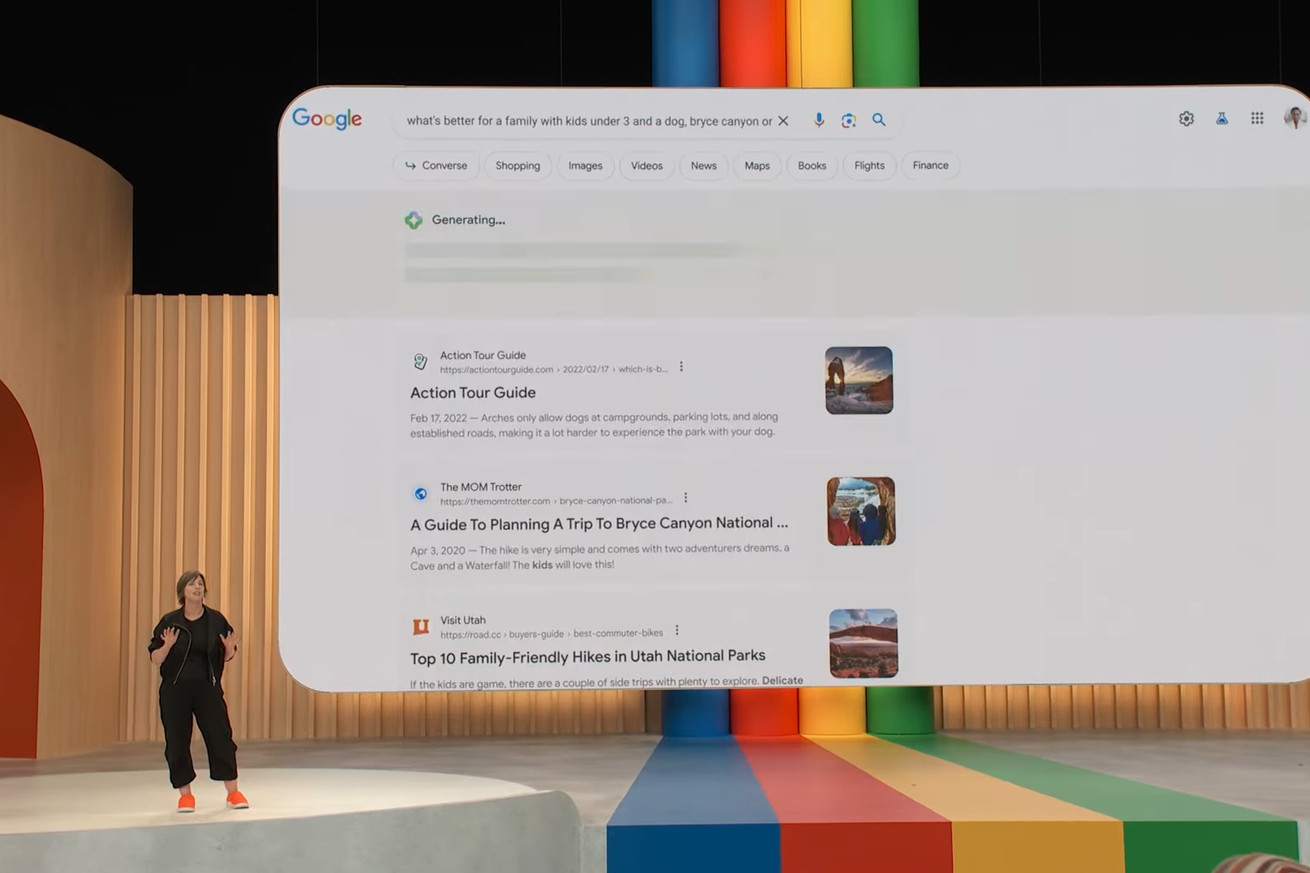
jaydiaz2013 posted: " Generating... | Image from Google's I/O 2023 keynote replay Why wait for an AI-generated summary when I can just scroll down the page? The worst thing about Google's new AI-powered search experience is how long you have to wait. C" Technopreneurph
Why wait for an AI-generated summary when I can just scroll down the page?
The worst thing about Google's new AI-powered search experience is how long you have to wait.
Can you think of the last time you waited for a Google Search result? For me, searches are generally instant. You type a thing in the search box, Google almost immediately spits out an answer to that thing, and then you can click some links to learn more about what you searched for or type something else into the box. It's a virtuous, useful cycle that has turned Google Search into the most visited website in the world.
Google's Search Generative Experience, on the other hand, has loading animations.
Let me back up a little. In May, Google introduced an experimental feature called Search Generative Experience (SGE) that uses Google's AI systems to summarize search results for you. The idea is that you won't have to click through a list of links or type something else in the search box; instead, Google will just tell you what you're looking for. In theory, that means your search queries can be more complex and conversational — a pitch we've heard before! — but Google will still be able to answer your questions.
If you've opted in to SGE, which is only available to people who sign up for Google's waitlist on its Search Labs, AI summaries will appear right under the search box. I've been using SGE for a few days, and I've found the responses themselves have been generally fine, if cluttered. For example, when I searched "where can I watch Ted Lasso?" the AI-generated response that appeared was a few sentences long and factually accurate. It's on Apple TV Plus. Apple TV Plus costs $6.99 per month. Great.
Screenshot by Jay Peters / The Verge
But the answers are often augmented with a bunch of extra stuff. On desktop, Google displays source information as cards on the right, even though you can't easily tell which pieces of information come from which sources (another button can help you with that). On mobile (well, only the Google app for now), the cards appear below the summarized text. Below the query response, you can click a series of potential follow-up prompts, and under all of that is a standard Google search result, which can be littered with additional info boxes.
That extra stuff in an SGE result isn't quite as helpful as it should be, either. When it showed off SGE at I/O, Google also showed how the tool could auto-generate a buying guide on the fly, so I thought "where can I buy Tears of the Kingdom?" would be a softball question. But the result was a mess, littered with giant sponsored cards above the result, a confusing list of suggested retail stores that didn't actually take me to listings for the game, a Google Map pinpointing those retail stores, and off to the right, three link cards where I could find my way to buying the game. A search for a used iPhone 13 Mini in red didn't go much better. I should have just scrolled down.
An increasingly cluttered search screen isn't exactly new territory for Google. What bothers me most about SGE is that its summaries take a few seconds to show up. As Google is generating an answer to your query, an empty colored box will appear, with loading bars fading in and out. When the search result finally loads, the colored box expands and Google's summary pops in, pushing the list of links down the page. I really don't like waiting for this; if I weren't testing specifically for this article, for many of my searches, I'd be immediately scrolling away from most generative AI responses so I could click on a link.
GIF by Jay Peters / The VergeGet used to seeing these bars.
Confusingly, SGE broke down for me at weird times, even with some of the top-searched terms. The words "YouTube," "Amazon," "Wordle," "Twitter," and "Roblox," for example, all returned an error message: "An AI-powered overview is not available for this search." "Facebook," "Gmail," "Apple," and "Netflix," on the other hand, all came back with perfectly fine SGE-formatted answers. But for the queries that were valid, the results took what felt like forever to show up.
When I was testing, the Gmail result showed up fastest, in about two seconds. Netflix's and Facebook's took about three and a half seconds, while Apple's took about five seconds. But for these single-word queries that failed, they all took more than five seconds to try and load before showing the error message, which was incredibly frustrating when I could have just scrolled down to click a link. The Tears of the Kingdom and iPhone 13 Mini queries both took more than six seconds to load — an internet eternity!
When I have to wait that long when I'm not specifically doing test queries, I just scroll down past the SGE results to get to something to read or click on. And when I have to tap my foot to wait for SGE answers that are often filled with cruft that I don't want to sift through, it's all just making the search experience worse for me.
Maybe I'm just stuck in my ways. I like to investigate sources for myself, and I'm generally distrustful of the things AI tools say. But as somebody who has wasted eons of his life looking at loading screens in streaming videos and video games, having to do so on Google Search is a deal-breaker for me. And when the results don't feel noticeably better than what I could get just by looking at what Google offered before, I don't think SGE is worth waiting for.


/cdn.vox-cdn.com/uploads/chorus_asset/file/24697759/Jun_01_2023_16_25_34.gif)





No comments:
Post a Comment