For a demo, I needed an environment with Minikube, using the Podman driver as an alternative container runtime to the Docker driver.
Lucky for me, I had the configuration for such an environment using Vagrant and Oracle VirtualBox. In the past, I already set up such a demo environment, available within an Oracle VirtualBox appliance, as I described in a series of articles.
[https://technology.amis.nl/2019/09/15/using-elastic-stack-filebeat-for-log-aggregation/]
This demo environment was built with quite some files, and included:
- guest Operating System (Ubuntu)
- Docker
- Minikube
- Kubectl
In this article, I will share with you the steps I took, to get Podman in combination with Kubernetes (Minikube), working on my demo environment.
Podman
Podman is an open-source project that is available on most Linux platforms and resides on GitHub. Podman is a daemonless container engine for developing, managing, and running Open Container Initiative (OCI) containers and container images on your Linux System. Podman provides a Docker-compatible command line front end that can simply alias the Docker cli, alias docker=podman. Podman also provides a socket activated REST API service to allow remote applications to launch on-demand containers. This REST API also supports the Docker API, allowing users of docker-py and docker-compose to interact with the Podman as a service.
Containers under the control of Podman can either be run by root or by a non-privileged user. Podman manages the entire container ecosystem which includes pods, containers, container images, and container volumes using the libpod library. Podman specializes in all of the commands and functions that help you to maintain and modify OCI container images, such as pulling and tagging. It allows you to create, run, and maintain those containers created from those images in a production environment.
The Podman service runs only on Linux platforms, however the podman remote REST API client exists on Mac and Windows platforms and can communicate with the Podman service running on a Linux machine or VM via ssh. See also: Podman Remote clients for macOS and Windows.
[https://podman.io/whatis.html]
Installing Podman
For installing Podman on Ubuntu, I followed the instructions "Podman Installation Instructions":
https://podman.io/getting-started/installation
The Podman package is available in the official repositories for Ubuntu 20.10 and newer.
Vagrantfile
I changed the content of Vagrantfile to:
[in bold, I highlighted the changes]
Vagrant.configure("2") do |config| config.vm.box = "generic/ubuntu2204" config.vm.define "ubuntu_podman_minikube" do |ubuntu_podman_minikube| config.vm.synced_folder "C:\\My\\AMIS\\MySharedFolder", "/mnt/mysharedfolder", automount: true config.vm.network "forwarded_port", guest: 8001, host: 8001, auto_correct: true config.vm.network "forwarded_port", guest: 8080, host: 8080, auto_correct: true config.vm.provider "virtualbox" do |vb| vb.name = "Ubuntu Podman Minikube" vb.memory = "8192" vb.cpus = "2" args = [] config.vm.provision "podman shell script", type: "shell", path: "scripts/podman.sh", args: args end end end As you can see in this file, I used shell scripts to install the software needed for my demo environment. I wanted to be able to use the Kubernetes Dashboard (in a Web Browser) on my Windows laptop, so I used the forwarded_port configuration option, to forward a port on my host (Windows) to a port on my guest (Ubuntu).
In the scripts directory I created a file podman.sh with the following content:
#!/bin/bash echo "**** Begin installing Podman" #Set up the repository ##Update the apt package index sudo apt-get -y update #Install Podman sudo apt-get -y install podman echo "**** End installing Podman"
From the subdirectory named env on my Windows laptop, I opened a Windows Command Prompt (cmd) and typed: vagrant up
This command creates and configures guest machines according to your Vagrantfile.
[https://www.vagrantup.com/docs/cli/up.html]
With the following output (only showing the part about Podman):
ubuntu_podman_minikube: **** Begin installing Podman ubuntu_podman_minikube: Hit:1 https://mirrors.edge.kernel.org/ubuntu jammy InRelease ubuntu_podman_minikube: Hit:2 https://mirrors.edge.kernel.org/ubuntu jammy-updates InRelease ubuntu_podman_minikube: Hit:3 https://mirrors.edge.kernel.org/ubuntu jammy-backports InRelease ubuntu_podman_minikube: Hit:4 https://mirrors.edge.kernel.org/ubuntu jammy-security InRelease ubuntu_podman_minikube: Reading package lists... ubuntu_podman_minikube: Reading package lists... ubuntu_podman_minikube: Building dependency tree... ubuntu_podman_minikube: Reading state information... ubuntu_podman_minikube: The following additional packages will be installed: ubuntu_podman_minikube: buildah catatonit conmon containernetworking-plugins crun ubuntu_podman_minikube: dconf-gsettings-backend dconf-service dns-root-data dnsmasq-base ubuntu_podman_minikube: fuse-overlayfs glib-networking glib-networking-common ubuntu_podman_minikube: glib-networking-services golang-github-containernetworking-plugin-dnsname ubuntu_podman_minikube: golang-github-containers-common golang-github-containers-image ubuntu_podman_minikube: gsettings-desktop-schemas libavahi-client3 libavahi-common-data ubuntu_podman_minikube: libavahi-common3 libavahi-glib1 libdconf1 libostree-1-1 libproxy1v5 ubuntu_podman_minikube: libslirp0 libsoup2.4-1 libsoup2.4-common libyajl2 session-migration ubuntu_podman_minikube: slirp4netns uidmap ubuntu_podman_minikube: Suggested packages: ubuntu_podman_minikube: containers-storage docker-compose ubuntu_podman_minikube: The following NEW packages will be installed: ubuntu_podman_minikube: buildah catatonit conmon containernetworking-plugins crun ubuntu_podman_minikube: dconf-gsettings-backend dconf-service dns-root-data dnsmasq-base ubuntu_podman_minikube: fuse-overlayfs glib-networking glib-networking-common ubuntu_podman_minikube: glib-networking-services golang-github-containernetworking-plugin-dnsname ubuntu_podman_minikube: golang-github-containers-common golang-github-containers-image ubuntu_podman_minikube: gsettings-desktop-schemas libavahi-client3 libavahi-common-data ubuntu_podman_minikube: libavahi-common3 libavahi-glib1 libdconf1 libostree-1-1 libproxy1v5 ubuntu_podman_minikube: libslirp0 libsoup2.4-1 libsoup2.4-common libyajl2 podman session-migration ubuntu_podman_minikube: slirp4netns uidmap ubuntu_podman_minikube: 0 upgraded, 32 newly installed, 0 to remove and 43 not upgraded. ubuntu_podman_minikube: Need to get 26.2 MB of archives. ubuntu_podman_minikube: After this operation, 115 MB of additional disk space will be used. ubuntu_podman_minikube: Get:1 https://mirrors.edge.kernel.org/ubuntu jammy/universe amd64 uidmap amd64 1:4.8.1-2ubuntu2 [22.1 kB] ubuntu_podman_minikube: Get:2 https://mirrors.edge.kernel.org/ubuntu jammy/universe amd64 golang-github-containers-image all 5.16.0-3 [29.3 kB] ... ubuntu_podman_minikube: dpkg-preconfigure: unable to re-open stdin: No such file or directory ubuntu_podman_minikube: Fetched 26.2 MB in 2s (11.9 MB/s) ubuntu_podman_minikube: Selecting previously unselected package uidmap. (Reading database ... 81010 files and directories currently installed.) ubuntu_podman_minikube: Preparing to unpack .../00-uidmap_1%3a4.8.1-2ubuntu2_amd64.deb ... ubuntu_podman_minikube: Unpacking uidmap (1:4.8.1-2ubuntu2) ... ubuntu_podman_minikube: Selecting previously unselected package golang-github-containers-image. ... ubuntu_podman_minikube: Setting up session-migration (0.3.6) ... ubuntu_podman_minikube: Created symlink /etc/systemd/user/graphical-session-pre.target.wants/session-migration.service → /usr/lib/systemd/user/session-migration.service. ubuntu_podman_minikube: Setting up libproxy1v5:amd64 (0.4.17-2) ... ubuntu_podman_minikube: Setting up uidmap (1:4.8.1-2ubuntu2) ... ubuntu_podman_minikube: Setting up libyajl2:amd64 (2.1.0-3build2) ... ubuntu_podman_minikube: Setting up dnsmasq-base (2.86-1.1ubuntu0.1) ... ubuntu_podman_minikube: Setting up dns-root-data (2021011101) ... ubuntu_podman_minikube: Setting up libdconf1:amd64 (0.40.0-3) ... ubuntu_podman_minikube: Setting up golang-github-containers-image (5.16.0-3) ... ubuntu_podman_minikube: Setting up conmon (2.0.25+ds1-1.1) ... ubuntu_podman_minikube: Setting up containernetworking-plugins (0.9.1+ds1-1) ... ubuntu_podman_minikube: Setting up catatonit (0.1.7-1) ... ubuntu_podman_minikube: Setting up libavahi-common-data:amd64 (0.8-5ubuntu5) ... ubuntu_podman_minikube: Setting up golang-github-containernetworking-plugin-dnsname (1.3.1+ds1-2) ... ubuntu_podman_minikube: Setting up libsoup2.4-common (2.74.2-3) ... ubuntu_podman_minikube: Setting up libslirp0:amd64 (4.6.1-1build1) ... ubuntu_podman_minikube: Setting up fuse-overlayfs (1.7.1-1) ... ubuntu_podman_minikube: Setting up golang-github-containers-common (0.44.4+ds1-1) ... ubuntu_podman_minikube: Setting up glib-networking-common (2.72.0-1) ... ubuntu_podman_minikube: Setting up glib-networking-services (2.72.0-1) ... ubuntu_podman_minikube: Setting up slirp4netns (1.0.1-2) ... ubuntu_podman_minikube: Setting up crun (0.17+dfsg-1.1) ... ubuntu_podman_minikube: Setting up libavahi-common3:amd64 (0.8-5ubuntu5) ... ubuntu_podman_minikube: Setting up podman (3.4.4+ds1-1ubuntu1) ... ubuntu_podman_minikube: Created symlink /etc/systemd/user/default.target.wants/podman.service → /usr/lib/systemd/user/podman.service. ubuntu_podman_minikube: Created symlink /etc/systemd/user/sockets.target.wants/podman.socket → /usr/lib/systemd/user/podman.socket. ubuntu_podman_minikube: Created symlink /etc/systemd/system/default.target.wants/podman.service → /lib/systemd/system/podman.service. ubuntu_podman_minikube: Created symlink /etc/systemd/system/sockets.target.wants/podman.socket → /lib/systemd/system/podman.socket. ubuntu_podman_minikube: Created symlink /etc/systemd/system/default.target.wants/podman-auto-update.service → /lib/systemd/system/podman-auto-update.service. ubuntu_podman_minikube: Created symlink /etc/systemd/system/timers.target.wants/podman-auto-update.timer → /lib/systemd/system/podman-auto-update.timer. ubuntu_podman_minikube: Created symlink /etc/systemd/system/default.target.wants/podman-restart.service → /lib/systemd/system/podman-restart.service. ubuntu_podman_minikube: Setting up dconf-service (0.40.0-3) ... ubuntu_podman_minikube: Setting up libavahi-glib1:amd64 (0.8-5ubuntu5) ... ubuntu_podman_minikube: Setting up libavahi-client3:amd64 (0.8-5ubuntu5) ... ubuntu_podman_minikube: Setting up dconf-gsettings-backend:amd64 (0.40.0-3) ... ubuntu_podman_minikube: Setting up gsettings-desktop-schemas (42.0-1ubuntu1) ... ubuntu_podman_minikube: Processing triggers for man-db (2.10.2-1) ... ubuntu_podman_minikube: Processing triggers for dbus (1.12.20-2ubuntu4) ... ubuntu_podman_minikube: Processing triggers for libglib2.0-0:amd64 (2.72.1-1) ... ubuntu_podman_minikube: Processing triggers for libc-bin (2.35-0ubuntu3.1) ... ubuntu_podman_minikube: Setting up glib-networking:amd64 (2.72.0-1) ... ubuntu_podman_minikube: Setting up libsoup2.4-1:amd64 (2.74.2-3) ... ubuntu_podman_minikube: Setting up libostree-1-1:amd64 (2022.2-3) ... ubuntu_podman_minikube: Setting up buildah (1.23.1+ds1-2) ... ubuntu_podman_minikube: Processing triggers for libc-bin (2.35-0ubuntu3.1) ... ubuntu_podman_minikube: ubuntu_podman_minikube: Running kernel seems to be up-to-date. ubuntu_podman_minikube: ubuntu_podman_minikube: Services to be restarted: ubuntu_podman_minikube: systemctl restart multipathd.service ubuntu_podman_minikube: systemctl restart packagekit.service ubuntu_podman_minikube: ubuntu_podman_minikube: No containers need to be restarted. ubuntu_podman_minikube: ubuntu_podman_minikube: No user sessions are running outdated binaries. ubuntu_podman_minikube: ubuntu_podman_minikube: No VM guests are running outdated hypervisor (qemu) binaries on this host. ubuntu_podman_minikube: **** End installing Podman
I used vagrant ssh to open a Linux Command Prompt where I used the following command, to get some help and find out how Podman is working:
podman --help
With the following output:
Manage pods, containers and images Usage: podman [options] [command] Available Commands: attach Attach to a running container auto-update Auto update containers according to their auto-update policy build Build an image using instructions from Containerfiles commit Create new image based on the changed container container Manage containers cp Copy files/folders between a container and the local filesystem create Create but do not start a container diff Display the changes to the object's file system events Show podman events exec Run a process in a running container export Export container's filesystem contents as a tar archive generate Generate structured data based on containers, pods or volumes healthcheck Manage health checks on containers help Help about any command history Show history of a specified image image Manage images images List images in local storage import Import a tarball to create a filesystem image info Display podman system information init Initialize one or more containers inspect Display the configuration of object denoted by ID kill Kill one or more running containers with a specific signal load Load image(s) from a tar archive login Login to a container registry logout Logout of a container registry logs Fetch the logs of one or more containers machine Manage a virtual machine manifest Manipulate manifest lists and image indexes mount Mount a working container's root filesystem network Manage networks pause Pause all the processes in one or more containers play Play containers, pods or volumes from a structured file pod Manage pods port List port mappings or a specific mapping for the container ps List containers pull Pull an image from a registry push Push an image to a specified destination rename Rename an existing container restart Restart one or more containers rm Remove one or more containers rmi Removes one or more images from local storage run Run a command in a new container save Save image(s) to an archive search Search registry for image secret Manage secrets start Start one or more containers stats Display a live stream of container resource usage statistics stop Stop one or more containers system Manage podman tag Add an additional name to a local image top Display the running processes of a container unmount Unmounts working container's root filesystem unpause Unpause the processes in one or more containers unshare Run a command in a modified user namespace untag Remove a name from a local image version Display the Podman version information volume Manage volumes wait Block on one or more containers Options: --cgroup-manager string Cgroup manager to use ("cgroupfs"|"systemd") (default "systemd") --cni-config-dir string Path of the configuration directory for CNI networks --conmon string Path of the conmon binary -c, --connection string Connection to use for remote Podman service --events-backend string Events backend to use ("file"|"journald"|"none") (default "journald") --help Help for podman --hooks-dir strings Set the OCI hooks directory path (may be set multiple times) (default [/usr/share/containers/oci/hooks.d]) --identity string path to SSH identity file, (CONTAINER_SSHKEY) --log-level string Log messages above specified level (trace, debug, info, warn, warning, error, fatal, panic) (default "warn") --namespace string Set the libpod namespace, used to create separate views of the containers and pods on the system --network-cmd-path string Path to the command for configuring the network -r, --remote Access remote Podman service (default false) --root string Path to the root directory in which data, including images, is stored --runroot string Path to the 'run directory' where all state information is stored --runtime string Path to the OCI-compatible binary used to run containers, default is /usr/bin/runc --runtime-flag stringArray add global flags for the container runtime --storage-driver string Select which storage driver is used to manage storage of images and containers (default is overlay) --storage-opt stringArray Used to pass an option to the storage driver --syslog Output logging information to syslog as well as the console (default false) --tmpdir string Path to the tmp directory for libpod state content. Note: use the environment variable 'TMPDIR' to change the temporary storage location for container images, '/var/tmp'. --url string URL to access Podman service (CONTAINER_HOST) (default "unix:/run/user/1000/podman/podman.sock") -v, --version version for podman From this I could the installation was successful, so I closed the Linux Command Prompt.
Next, I had a look at the script minikube.sh, I created in the past:
#!/bin/bash echo "**** Begin downloading minikube" #Kubernetes 1.22.3 requires conntrack to be installed in root's path sudo apt install -y conntrack #Download a static binary curl -o minikube https://storage.googleapis.com/minikube/releases/v1.24.0/minikube-linux-amd64 chmod +x minikube #Add the Minikube executable to your path sudo cp minikube /usr/local/bin/ rm minikube echo "**** End downloading minikube" echo "**** Begin starting a Cluster" sudo sysctl fs.protected_regular=0 #Start a Cluster minikube start \ --vm-driver=none \ --extra-config=kubeadm.node-name=minikube \ --extra-config=kubelet.hostname-override=minikube #To use kubectl or minikube commands as your own user, you may need to relocate them. sudo cp -R /root/.kube /root/.minikube /home/vagrant sudo chown -R vagrant /home/vagrant/.kube /home/vagrant/.minikube sed -i 's/root/home\/vagrant/g' /home/vagrant/.kube/config echo "**** End starting a Cluster" echo "**** Begin preparing dashboard" minikube dashboard --url </dev/null &>/dev/null & echo "**** End preparing dashboard" minikube kubectl -- get pods -A
I had a look at minikube / Documentation / Get Started!:
https://minikube.sigs.k8s.io/docs/start/
From there, for a complete list of minikube binaries, I navigated to the release page:
https://github.com/kubernetes/minikube/releases
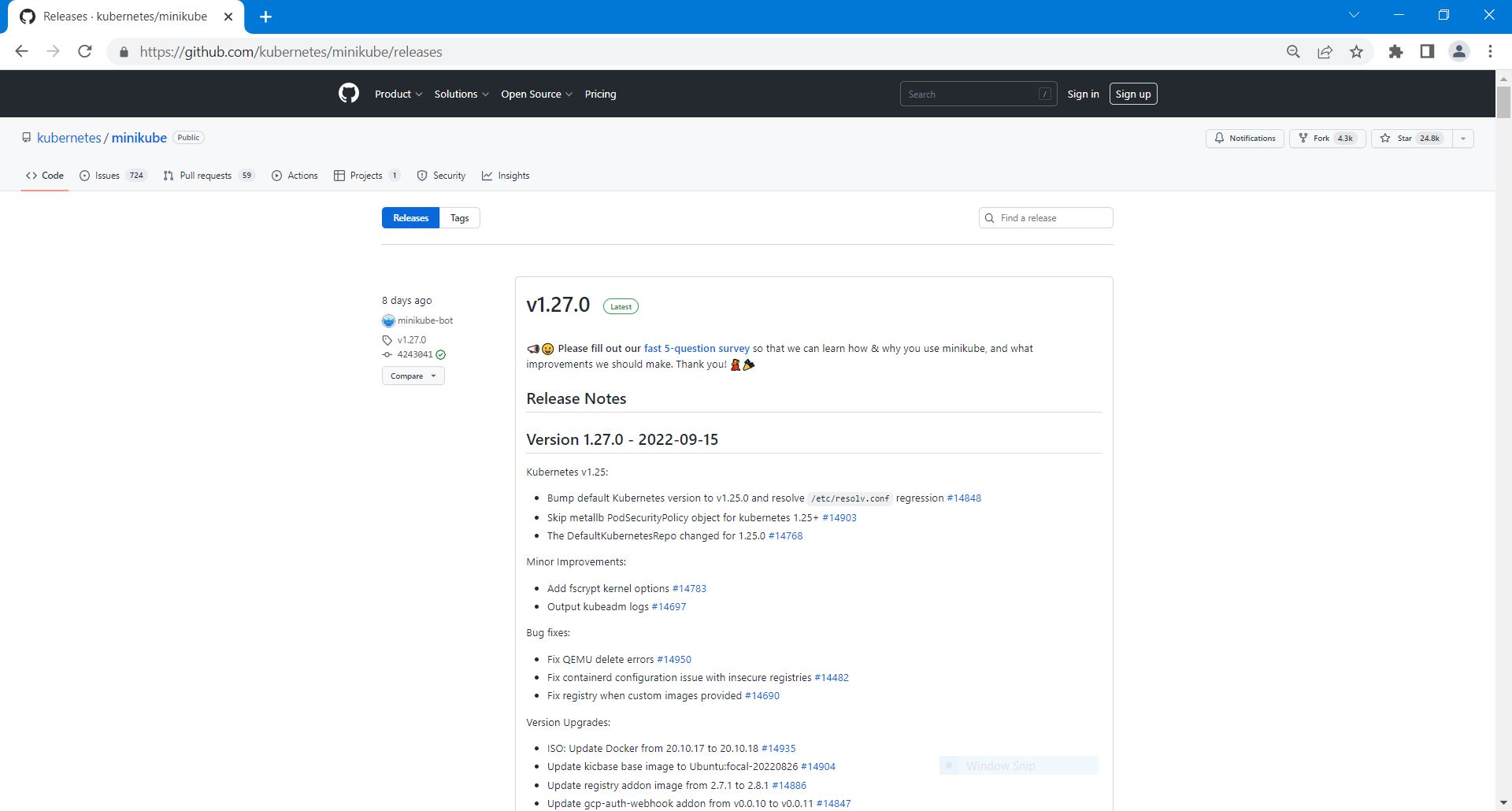
So, the latest minikube release was v1.27.0.
Remember from my previous articles about minikube, I was using the --vm-driver=none option.
[https://technology.amis.nl/continuous-delivery/containers/trouble-shooting-while-upgrading-a-vm-with-minikube-elasticsearch-and-kibana-using-the-vm-drivernone-option-on-my-windows-laptop-using-vagrant-and-oracle-virtualbox/]
But this time, I wanted to use the podman driver.
This is an experimental driver. Please use it only for experimental reasons until it has reached maturity. For a more reliable minikube experience, use a non-experimental driver, like Docker.
It's recommended to run minikube with the podman driver and CRI-O container runtime (except when using Rootless Podman):
[https://minikube.sigs.k8s.io/docs/drivers/podman/]
minikube start --driver=podman --container-runtime=cri-o
And of course, I wanted to use the latest version of minikube.
So, I changed the content of script minikube.sh to:
[in bold, I highlighted the changes]
#!/bin/bash echo "**** Begin downloading minikube" #Kubernetes 1.22.3 requires conntrack to be installed in root's path sudo apt install -y conntrack #Download a static binary curl -o minikube https://storage.googleapis.com/minikube/releases/v1.27.0/minikube-linux-amd64 chmod +x minikube #Add the Minikube executable to your path sudo cp minikube /usr/local/bin/ rm minikube echo "**** End downloading minikube" echo "**** Begin starting a Cluster" sudo sysctl fs.protected_regular=0 #Start a Cluster minikube start \ --vm-driver=none \ --driver=podman \ --container-runtime=cri-o \ --extra-config=kubeadm.node-name=minikube \ --extra-config=kubelet.hostname-override=minikube #To use kubectl or minikube commands as your own user, you may need to relocate them. sudo cp -R /root/.kube /root/.minikube /home/vagrant sudo chown -R vagrant /home/vagrant/.kube /home/vagrant/.minikube sed -i 's/root/home\/vagrant/g' /home/vagrant/.kube/config echo "**** End starting a Cluster" echo "**** Begin preparing dashboard" minikube dashboard --url </dev/null &>/dev/null & echo "**** End preparing dashboard" minikube kubectl -- get pods -A
I changed the content of Vagrantfile to:
[in bold, I highlighted the changes]
Vagrant.configure("2") do |config| config.vm.box = "generic/ubuntu2204" config.vm.define "ubuntu_podman_minikube" do |ubuntu_podman_minikube| config.vm.synced_folder "C:\\My\\AMIS\\MySharedFolder", "/mnt/mysharedfolder", automount: true config.vm.network "forwarded_port", guest: 8001, host: 8001, auto_correct: true config.vm.network "forwarded_port", guest: 8080, host: 8080, auto_correct: true config.vm.provider "virtualbox" do |vb| vb.name = "Ubuntu Podman Minikube" vb.memory = "8192" vb.cpus = "2" args = [] config.vm.provision "podman shell script", type: "shell", path: "scripts/podman.sh", args: args args = [] config.vm.provision "minikube shell script", type: "shell", path: "scripts/minikube.sh", privileged: false, args: args end end In order to stop the running machine and destroy its resources, I used the following command on the Windows Command Prompt: vagrant destroy
I won't mention this step for readability, but after each vagrant up, I used it.
Again, on my Windows laptop, I used vagrant up and looked at the output:
ubuntu_podman_minikube: **** Begin downloading minikube ubuntu_podman_minikube: ubuntu_podman_minikube: WARNING: apt does not have a stable CLI interface. Use with caution in scripts. ubuntu_podman_minikube: ubuntu_podman_minikube: Reading package lists... ubuntu_podman_minikube: Building dependency tree... ubuntu_podman_minikube: Reading state information... ubuntu_podman_minikube: The following NEW packages will be installed: ubuntu_podman_minikube: conntrack ubuntu_podman_minikube: 0 upgraded, 1 newly installed, 0 to remove and 43 not upgraded. ubuntu_podman_minikube: Need to get 33.5 kB of archives. ubuntu_podman_minikube: After this operation, 104 kB of additional disk space will be used. ubuntu_podman_minikube: Get:1 https://mirrors.edge.kernel.org/ubuntu jammy/main amd64 conntrack amd64 1:1.4.6-2build2 [33.5 kB] ubuntu_podman_minikube: dpkg-preconfigure: unable to re-open stdin: No such file or directory ubuntu_podman_minikube: Fetched 33.5 kB in 0s (174 kB/s) ubuntu_podman_minikube: Selecting previously unselected package conntrack. (Reading database ... 81584 files and directories currently installed.) ubuntu_podman_minikube: Preparing to unpack .../conntrack_1%3a1.4.6-2build2_amd64.deb ... ubuntu_podman_minikube: Unpacking conntrack (1:1.4.6-2build2) ... ubuntu_podman_minikube: Setting up conntrack (1:1.4.6-2build2) ... ubuntu_podman_minikube: Processing triggers for man-db (2.10.2-1) ... ubuntu_podman_minikube: ubuntu_podman_minikube: Running kernel seems to be up-to-date. ubuntu_podman_minikube: ubuntu_podman_minikube: Services to be restarted: ubuntu_podman_minikube: systemctl restart multipathd.service ubuntu_podman_minikube: systemctl restart packagekit.service ubuntu_podman_minikube: ubuntu_podman_minikube: No containers need to be restarted. ubuntu_podman_minikube: ubuntu_podman_minikube: No user sessions are running outdated binaries. ubuntu_podman_minikube: ubuntu_podman_minikube: No VM guests are running outdated hypervisor (qemu) binaries on this host. ubuntu_podman_minikube: % Total % Received % Xferd Average Speed Time Time Time Current ubuntu_podman_minikube: Dload Upload Total Spent … ubuntu_podman_minikube: **** End downloading minikube ubuntu_podman_minikube: **** Begin starting a Cluster ubuntu_podman_minikube: fs.protected_regular = 0 ubuntu_podman_minikube: * minikube v1.27.0 on Ubuntu 22.04 (vbox/amd64) ubuntu_podman_minikube: ! Kubernetes 1.25.0 has a known issue with resolv.conf. minikube is using a workaround that should work for most use cases. ubuntu_podman_minikube: ! For more information, see: https://github.com/kubernetes/kubernetes/issues/112135 ubuntu_podman_minikube: * Using the podman driver based on user configuration ubuntu_podman_minikube: * Using Podman driver with root privileges ubuntu_podman_minikube: * Starting control plane node minikube in cluster minikube ubuntu_podman_minikube: * Pulling base image ... ubuntu_podman_minikube: * Downloading Kubernetes v1.25.0 preload ... ... ubuntu_podman_minikube: * Creating podman container (CPUs=2, Memory=2200MB) ... ubuntu_podman_minikube: * Preparing Kubernetes v1.25.0 on CRI-O 1.24.2 ... ubuntu_podman_minikube: - kubeadm.node-name=minikube ubuntu_podman_minikube: - kubelet.hostname-override=minikube ubuntu_podman_minikube: - Generating certificates and keys ... ubuntu_podman_minikube: - Booting up control plane ... ubuntu_podman_minikube: - Configuring RBAC rules ... ubuntu_podman_minikube: * Configuring CNI (Container Networking Interface) ... ubuntu_podman_minikube: * Verifying Kubernetes components... ubuntu_podman_minikube: - Using image gcr.io/k8s-minikube/storage-provisioner:v5 ubuntu_podman_minikube: * Enabled addons: storage-provisioner, default-storageclass ubuntu_podman_minikube: * kubectl not found. If you need it, try: 'minikube kubectl -- get pods -A' ubuntu_podman_minikube: * Done! kubectl is now configured to use "minikube" cluster and "default" namespace by default"default" namespace by default ubuntu_podman_minikube: cp: cannot stat '/root/.kube': No such file or directory ubuntu_podman_minikube: cp: cannot stat '/root/.minikube': No such file or directory ubuntu_podman_minikube: **** End starting a Cluster ubuntu_podman_minikube: **** Begin preparing dashboard ubuntu_podman_minikube: **** End preparing dashboard ubuntu_podman_minikube: NAMESPACE NAME READY STATUS RESTARTS AGE ubuntu_podman_minikube: kube-system coredns-6d4b75cb6d-62nhc 0/1 Running 0 12s ubuntu_podman_minikube: kube-system etcd-minikube 1/1 Running 0 25s ubuntu_podman_minikube: kube-system kindnet-67rlp 0/1 ContainerCreating 0 13s ubuntu_podman_minikube: kube-system kube-apiserver-minikube 1/1 Running 0 24s ubuntu_podman_minikube: kube-system kube-controller-manager-minikube 1/1 Running 0 24s ubuntu_podman_minikube: kube-system kube-proxy-z7dnp 1/1 Running 0 13s ubuntu_podman_minikube: kube-system kube-scheduler-minikube 1/1 Running 0 24s ubuntu_podman_minikube: kube-system storage-provisioner 1/1 Running 0 21s ubuntu_podman_minikube: kubernetes-dashboard dashboard-metrics-scraper-78dbd9dbf5-xs7v4 0/1 ContainerCreating 0 12s ubuntu_podman_minikube: kubernetes-dashboard kubernetes-dashboard-5fd5574d9f-t842d 0/1 ContainerCreating 0 12s
In this output I noticed:
- some errors (No such file or directory) with regard to using kubectl or minikube commands as your own user
- not all pods were in a Running state at the time the minikube kubectl -- get pods -A command was executed
I used vagrant ssh to open a Linux Command Prompt where I used the following commands:
pwd ls -latr
With the following output:
total 40 -rw-r--r-- 1 vagrant vagrant 807 Jan 6 2022 .profile -rw-r--r-- 1 vagrant vagrant 220 Jan 6 2022 .bash_logout drwxr-xr-x 3 root root 4096 Sep 2 15:46 .. -rw-r--r-- 1 vagrant vagrant 3775 Sep 2 15:56 .bashrc -rw-r--r-- 1 vagrant vagrant 13 Sep 2 15:56 .vimrc drwxr-xr-x 2 vagrant vagrant 4096 Sep 2 15:56 .cache drwx------ 2 vagrant vagrant 4096 Sep 23 17:33 .ssh drwxr-xr-x 10 vagrant vagrant 4096 Sep 23 17:37 .minikube drwxr-x--- 6 vagrant vagrant 4096 Sep 23 17:37 . drwxr-xr-x 3 vagrant vagrant 4096 Sep 23 17:38 .kube
So, here I could see, the .kube and .minikube directories were created under my own user (vagrant).
I closed the Linux Command Prompt.
Next, I changed the content of script minikube.sh to:
[in bold, I highlighted the changes]
#!/bin/bash echo "**** Begin downloading minikube" #Kubernetes 1.22.3 requires conntrack to be installed in root's path sudo apt install -y conntrack #Download a static binary curl -o minikube https://storage.googleapis.com/minikube/releases/v1.27.0/minikube-linux-amd64 chmod +x minikube #Add the Minikube executable to your path sudo cp minikube /usr/local/bin/ rm minikube echo "**** End downloading minikube" echo "**** Begin starting a Cluster" sudo sysctl fs.protected_regular=0 #Start a Cluster minikube start \ --driver=podman \ --container-runtime=cri-o \ --extra-config=kubeadm.node-name=minikube \ --extra-config=kubelet.hostname-override=minikube #To use kubectl or minikube commands as your own user, you may need to relocate them. sudo cp -R /root/.kube /root/.minikube /home/vagrant sudo chown -R vagrant /home/vagrant/.kube /home/vagrant/.minikube sed -i 's/root/home\/vagrant/g' /home/vagrant/.kube/config echo "**** End starting a Cluster" echo "**** Begin preparing dashboard" minikube dashboard --url </dev/null &>/dev/null & echo "**** End preparing dashboard" # Wait 45 seconds echo "**** Waiting 45 seconds ..." sleep 45 minikube kubectl -- get pods -A
I changed the content of Vagrantfile to:
[in bold, I highlighted the changes]
Vagrant.configure("2") do |config| config.vm.box = "generic/ubuntu2204" config.vm.define "ubuntu_podman_minikube" do |ubuntu_podman_minikube| config.vm.network "forwarded_port", guest: 8001, host: 8001, auto_correct: true config.vm.network "forwarded_port", guest: 8080, host: 8080, auto_correct: true config.vm.provider "virtualbox" do |vb| vb.name = "Ubuntu Podman Minikube" vb.memory = "8192" vb.cpus = "2" args = [] config.vm.provision "podman shell script", type: "shell", path: "scripts/podman.sh", args: args args = [] config.vm.provision "minikube shell script", type: "shell", path: "scripts/minikube.sh", privileged: false, args: args args = [] config.vm.provision "kubectl shell script", type: "shell", path: "scripts/kubectl.sh", privileged: false, args: args end end end This was the kubectl.sh script I used:
#!/bin/bash echo "**** Begin installing kubectl" #Install kubectl binary sudo apt-get update && sudo apt-get install -y apt-transport-https curl -s https://packages.cloud.google.com/apt/doc/apt-key.gpg | sudo apt-key add - echo "deb https://apt.kubernetes.io/ kubernetes-xenial main" | sudo tee -a /etc/apt/sources.list.d/kubernetes.list sudo apt-get update sudo apt-get install -y kubectl #Check the kubectl configuration kubectl cluster-info echo "**** End installing kubectl" echo "**** Begin preparing dashboard" kubectl proxy --address='0.0.0.0' </dev/null &>/dev/null & echo "**** End preparing dashboard" #Install socat sudo apt-get install socat echo "**** Determine the IP of the minikube node" nodeIP=$(kubectl get node minikube -o yaml | grep address: | grep -E -o "([0-9]{1,3}[\.]){3}[0-9]{1,3}") echo "---$nodeIP---" echo "**** Via socat forward local port 8080 to port 8080 on the minikube node ($nodeIP)" socat tcp-listen:8080,fork tcp:$nodeIP:8080 & Again, on my Windows laptop, I used vagrant up and looked at the output:
ubuntu_podman_minikube: * Done! kubectl is now configured to use "minikube" cluster and "default" namespace by default ubuntu_podman_minikube: **** End starting a Cluster ubuntu_podman_minikube: **** Begin preparing dashboard ubuntu_podman_minikube: **** End preparing dashboard ubuntu_podman_minikube: **** Waiting 45 seconds ... ubuntu_podman_minikube: NAMESPACE NAME READY STATUS RESTARTS AGE ubuntu_podman_minikube: kube-system coredns-565d847f94-rdzfm 1/1 Running 0 36s ubuntu_podman_minikube: kube-system etcd-minikube 1/1 Running 0 50s ubuntu_podman_minikube: kube-system kindnet-vdgsl 1/1 Running 0 36s ubuntu_podman_minikube: kube-system kube-apiserver-minikube 1/1 Running 0 48s ubuntu_podman_minikube: kube-system kube-controller-manager-minikube 1/1 Running 0 48s ubuntu_podman_minikube: kube-system kube-proxy-8scpb 1/1 Running 0 36s ubuntu_podman_minikube: kube-system kube-scheduler-minikube 1/1 Running 0 50s ubuntu_podman_minikube: kube-system storage-provisioner 1/1 Running 1 (6s ago) 45s ubuntu_podman_minikube: kubernetes-dashboard dashboard-metrics-scraper-b74747df5-fbqqs 1/1 Running 0 36s ubuntu_podman_minikube: kubernetes-dashboard kubernetes-dashboard-54596f475f-6pxdh 1/1 Running 0 36s ==> ubuntu_podman_minikube: Running provisioner: kubectl shell script (shell)... ubuntu_podman_minikube: Running: C:/Users/marc_l/AppData/Local/Temp/vagrant-shell20220923-12528-1iozzfi.sh ubuntu_podman_minikube: **** Begin installing kubectl ubuntu_podman_minikube: Hit:1 https://mirrors.edge.kernel.org/ubuntu jammy InRelease ubuntu_podman_minikube: Hit:2 https://mirrors.edge.kernel.org/ubuntu jammy-updates InRelease ubuntu_podman_minikube: Hit:3 https://mirrors.edge.kernel.org/ubuntu jammy-backports InRelease ubuntu_podman_minikube: Hit:4 https://mirrors.edge.kernel.org/ubuntu jammy-security InRelease ubuntu_podman_minikube: Reading package lists... ubuntu_podman_minikube: Reading package lists... ubuntu_podman_minikube: Building dependency tree... ubuntu_podman_minikube: Reading state information... ubuntu_podman_minikube: The following NEW packages will be installed: ubuntu_podman_minikube: apt-transport-https ubuntu_podman_minikube: 0 upgraded, 1 newly installed, 0 to remove and 43 not upgraded. ubuntu_podman_minikube: Need to get 1,512 B of archives. ubuntu_podman_minikube: After this operation, 169 kB of additional disk space will be used. ubuntu_podman_minikube: Get:1 https://mirrors.edge.kernel.org/ubuntu jammy-updates/universe amd64 apt-transport-https all 2.4.7 [1,512 B] ubuntu_podman_minikube: dpkg-preconfigure: unable to re-open stdin: No such file or directory ubuntu_podman_minikube: Fetched 1,512 B in 0s (13.6 kB/s) ubuntu_podman_minikube: Selecting previously unselected package apt-transport-https. (Reading database ... 81589 files and directories currently installed.) ubuntu_podman_minikube: Preparing to unpack .../apt-transport-https_2.4.7_all.deb ... ubuntu_podman_minikube: Unpacking apt-transport-https (2.4.7) ... ubuntu_podman_minikube: Setting up apt-transport-https (2.4.7) ... ubuntu_podman_minikube: ubuntu_podman_minikube: Running kernel seems to be up-to-date. ubuntu_podman_minikube: ubuntu_podman_minikube: Services to be restarted: ubuntu_podman_minikube: systemctl restart multipathd.service ubuntu_podman_minikube: systemctl restart packagekit.service ubuntu_podman_minikube: ubuntu_podman_minikube: No containers need to be restarted. ubuntu_podman_minikube: ubuntu_podman_minikube: No user sessions are running outdated binaries. ubuntu_podman_minikube: ubuntu_podman_minikube: No VM guests are running outdated hypervisor (qemu) binaries on this host. ubuntu_podman_minikube: Warning: apt-key is deprecated. Manage keyring files in trusted.gpg.d instead (see apt-key(8)). ubuntu_podman_minikube: OK ubuntu_podman_minikube: deb https://apt.kubernetes.io/ kubernetes-xenial main ubuntu_podman_minikube: Hit:1 https://mirrors.edge.kernel.org/ubuntu jammy InRelease ubuntu_podman_minikube: Hit:2 https://mirrors.edge.kernel.org/ubuntu jammy-updates InRelease ubuntu_podman_minikube: Hit:3 https://mirrors.edge.kernel.org/ubuntu jammy-backports InRelease ubuntu_podman_minikube: Hit:4 https://mirrors.edge.kernel.org/ubuntu jammy-security InRelease ubuntu_podman_minikube: Get:5 https://packages.cloud.google.com/apt kubernetes-xenial InRelease [9,383 B] ubuntu_podman_minikube: Get:6 https://packages.cloud.google.com/apt kubernetes-xenial/main amd64 Packages [60.1 kB] ubuntu_podman_minikube: Fetched 69.5 kB in 2s (33.9 kB/s) ubuntu_podman_minikube: Reading package lists... ubuntu_podman_minikube: W: https://apt.kubernetes.io/dists/kubernetes-xenial/InRelease: Key is stored in legacy trusted.gpg keyring (/etc/apt/trusted.gpg), see the DEPRECATION section in apt-key(8) for details. ubuntu_podman_minikube: Reading package lists... ubuntu_podman_minikube: Building dependency tree... ubuntu_podman_minikube: Reading state information... ubuntu_podman_minikube: The following NEW packages will be installed: ubuntu_podman_minikube: kubectl ubuntu_podman_minikube: 0 upgraded, 1 newly installed, 0 to remove and 43 not upgraded. ubuntu_podman_minikube: Need to get 9,503 kB of archives. ubuntu_podman_minikube: After this operation, 45.0 MB of additional disk space will be used. ubuntu_podman_minikube: Get:1 https://packages.cloud.google.com/apt kubernetes-xenial/main amd64 kubectl amd64 1.25.2-00 [9,503 kB] ubuntu_podman_minikube: dpkg-preconfigure: unable to re-open stdin: No such file or directory ubuntu_podman_minikube: Fetched 9,503 kB in 2s (6,137 kB/s) ubuntu_podman_minikube: Selecting previously unselected package kubectl. (Reading database ... 81593 files and directories currently installed.) ubuntu_podman_minikube: Preparing to unpack .../kubectl_1.25.2-00_amd64.deb ... ubuntu_podman_minikube: Unpacking kubectl (1.25.2-00) ... ubuntu_podman_minikube: Setting up kubectl (1.25.2-00) ... ubuntu_podman_minikube: ubuntu_podman_minikube: Running kernel seems to be up-to-date. ubuntu_podman_minikube: ubuntu_podman_minikube: Services to be restarted: ubuntu_podman_minikube: systemctl restart multipathd.service ubuntu_podman_minikube: systemctl restart packagekit.service ubuntu_podman_minikube: ubuntu_podman_minikube: No containers need to be restarted. ubuntu_podman_minikube: ubuntu_podman_minikube: No user sessions are running outdated binaries. ubuntu_podman_minikube: ubuntu_podman_minikube: No VM guests are running outdated hypervisor (qemu) binaries on this host. ubuntu_podman_minikube: Kubernetes control plane is running at https://192.168.49.2:8443 ubuntu_podman_minikube: CoreDNS is running at https://192.168.49.2:8443/api/v1/namespaces/kube-system/services/kube-dns:dns/proxy ubuntu_podman_minikube: ubuntu_podman_minikube: To further debug and diagnose cluster problems, use 'kubectl cluster-info dump'. ubuntu_podman_minikube: **** End installing kubectl ubuntu_podman_minikube: **** Begin preparing dashboard ubuntu_podman_minikube: **** End preparing dashboard ubuntu_podman_minikube: Reading package lists... ubuntu_podman_minikube: Building dependency tree... ubuntu_podman_minikube: Reading state information... ubuntu_podman_minikube: The following NEW packages will be installed: ubuntu_podman_minikube: socat ubuntu_podman_minikube: 0 upgraded, 1 newly installed, 0 to remove and 43 not upgraded. ubuntu_podman_minikube: Need to get 349 kB of archives. ubuntu_podman_minikube: After this operation, 1,381 kB of additional disk space will be used. ubuntu_podman_minikube: Get:1 https://mirrors.edge.kernel.org/ubuntu jammy/main amd64 socat amd64 1.7.4.1-3ubuntu4 [349 kB] ubuntu_podman_minikube: dpkg-preconfigure: unable to re-open stdin: No such file or directory ubuntu_podman_minikube: Fetched 349 kB in 0s (2,110 kB/s) ubuntu_podman_minikube: Selecting previously unselected package socat. (Reading database ... 81594 files and directories currently installed.) ubuntu_podman_minikube: Preparing to unpack .../socat_1.7.4.1-3ubuntu4_amd64.deb ... ubuntu_podman_minikube: Unpacking socat (1.7.4.1-3ubuntu4) ... ubuntu_podman_minikube: Setting up socat (1.7.4.1-3ubuntu4) ... ubuntu_podman_minikube: Processing triggers for man-db (2.10.2-1) ... ubuntu_podman_minikube: ubuntu_podman_minikube: Running kernel seems to be up-to-date. ubuntu_podman_minikube: ubuntu_podman_minikube: Services to be restarted: ubuntu_podman_minikube: systemctl restart multipathd.service ubuntu_podman_minikube: systemctl restart packagekit.service ubuntu_podman_minikube: ubuntu_podman_minikube: No containers need to be restarted. ubuntu_podman_minikube: ubuntu_podman_minikube: No user sessions are running outdated binaries. ubuntu_podman_minikube: ubuntu_podman_minikube: No VM guests are running outdated hypervisor (qemu) binaries on this host. ubuntu_podman_minikube: **** Determine the IP of the minikube node ubuntu_podman_minikube: ---192.168.49.2--- ubuntu_podman_minikube: **** Via socat forward local port 8080 to port 8080 on the minikube node (192.168.49.2)
Kubernetes Dashboard
In the Web Browser on my Windows laptop, I started the Kubernetes Dashboard:
http://127.0.0.1:8001/api/v1/namespaces/kubernetes-dashboard/services/http:kubernetes-dashboard:/proxy/#/service?namespace=_all
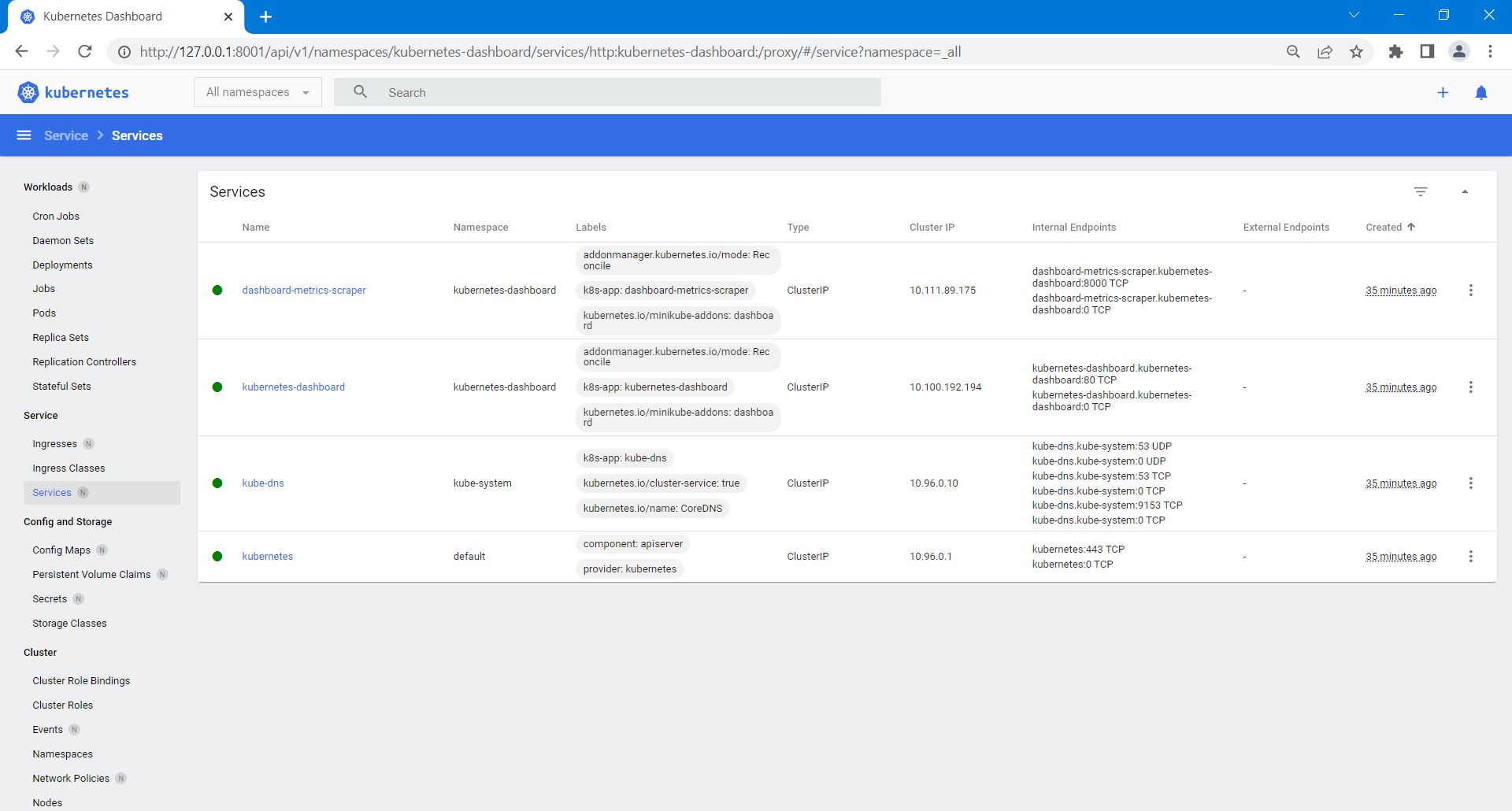
So, the base for my environment was set up.
It was time to check if Podman was working.
Getting Started with Podman, trying out a few podman commands
I wanted to try out some Podman commands, so I looked at "Getting Started with Podman".
[https://podman.io/getting-started/#getting-started-with-podman]
I used vagrant ssh to open a Linux Command Prompt where I used the following command, to lists the running containers on the system:
[https://docs.podman.io/en/latest/markdown/podman-ps.1.html]
podman ps
With the following output:
CONTAINER ID IMAGE COMMAND CREATED STATUS PORTS NAMES
To display locally stored images, I used the following command on the Linux Command Prompt:
[https://docs.podman.io/en/latest/markdown/podman-images.1.html]
podman images
With the following output:
REPOSITORY TAG IMAGE ID CREATED SIZE
To display information pertinent to the host, current storage stats, configured container registries, and build of Podman, I used the following command on the Linux Command Prompt:
[https://docs.podman.io/en/latest/markdown/podman-info.1.html]
podman info
With the following output:
host: arch: amd64 buildahVersion: 1.23.1 cgroupControllers: - memory - pids cgroupManager: systemd cgroupVersion: v2 conmon: package: 'conmon: /usr/bin/conmon' path: /usr/bin/conmon version: 'conmon version 2.0.25, commit: unknown' cpus: 2 distribution: codename: jammy distribution: ubuntu version: "22.04" eventLogger: journald hostname: ubuntu2204.localdomain idMappings: gidmap: - container_id: 0 host_id: 1000 size: 1 - container_id: 1 host_id: 100000 size: 65536 uidmap: - container_id: 0 host_id: 1000 size: 1 - container_id: 1 host_id: 100000 size: 65536 kernel: 5.15.0-47-generic linkmode: dynamic logDriver: journald memFree: 1592393728 memTotal: 8336216064 ociRuntime: name: crun package: 'crun: /usr/bin/crun' path: /usr/bin/crun version: |- crun version 0.17 commit: 0e9229ae34caaebcb86f1fde18de3acaf18c6d9a spec: 1.0.0 +SYSTEMD +SELINUX +APPARMOR +CAP +SECCOMP +EBPF +YAJL os: linux remoteSocket: path: /run/user/1000/podman/podman.sock security: apparmorEnabled: false capabilities: CAP_CHOWN,CAP_DAC_OVERRIDE,CAP_FOWNER,CAP_FSETID,CAP_KILL,CAP_NET_BIND_SERVICE,CAP_SETFCAP,CAP_SETGID,CAP_SETPCAP,CAP_SETUID,CAP_SYS_CHROOT rootless: true seccompEnabled: true seccompProfilePath: /usr/share/containers/seccomp.json selinuxEnabled: false serviceIsRemote: false slirp4netns: executable: /usr/bin/slirp4netns package: 'slirp4netns: /usr/bin/slirp4netns' version: |- slirp4netns version 1.0.1 commit: 6a7b16babc95b6a3056b33fb45b74a6f62262dd4 libslirp: 4.6.1 swapFree: 2147479552 swapTotal: 2147479552 uptime: 41m 47.85s plugins: log: - k8s-file - none - journald network: - bridge - macvlan volume: - local registries: {} store: configFile: /home/vagrant/.config/containers/storage.conf containerStore: number: 0 paused: 0 running: 0 stopped: 0 graphDriverName: overlay graphOptions: {} graphRoot: /home/vagrant/.local/share/containers/storage graphStatus: Backing Filesystem: extfs Native Overlay Diff: "true" Supports d_type: "true" Using metacopy: "false" imageStore: number: 0 runRoot: /run/user/1000/containers volumePath: /home/vagrant/.local/share/containers/storage/volumes version: APIVersion: 3.4.4 Built: 0 BuiltTime: Thu Jan 1 00:00:00 1970 GitCommit: "" GoVersion: go1.17.3 OsArch: linux/amd64 Version: 3.4.4 So, Podman was working. Great!
With exit I closed the ssh Windows Command Prompt.
In a next article, you can read more about other Podman commands I tried out, as I continued following "Getting Started with Podman".
You can find the code, belonging to my article, here:
https://github.com/marclameriks/amis-technology-blog-2022-09-1





No comments:
Post a Comment